A friend of mine recently asked me what my thoughts were around connected home/small business. He's kindly agreed to sharing the response.
...
In my humble opinion, it's all just verticals until something comes along to unify things and make life simpler.
It is about the Platform today. In the future it will be about how we act on the data we have. This will most likely shift to AI in some IoT fashion.
At the moment, I think we're are approaching a Wardly WAR stage with quite a lot of the capabilities moving from custom into product. http://blog.gardeviance.org/2015/02/on-evolution-disruption-and-pace-of.html
It's pre-industrialization of the capabilities that actually prove themselves both useful and offset either a cost, a time pressure or a labor effort that typically seem to win.
It'll almost always be about situational awareness though. A person will eventually see the thing that stands to make a serious and significant change that takes hold of one of the ecoystems and gives it a big push.
That's almost always an abstraction of the capability. I took a wild swing at one of the computing areas as an example. The abstraction of programming I called "codeless programming" that uses visual context rather than programming languages to build applications. It's the next step past "serverless" where inputs are tied to outputs by people not necessarily programming any of the intermediary application chains. http://www.abusedbits.com/2017/04/codeless-programming.html
Zuckerberg is running an experiment along these lines with his integration of capabilities using an AI.
https://www.youtube.com/watch?v=vvimBPJ3XGQ
Thing is, getting everything to work together is ridiculously complex. Either commonality in method for integration or something that can manage the complexity is required before this is anything other than a really expensive and time consuming hobby. And then there's the data capture....
My brother has a sensor network that he literally built into his house to record a variety of data. The first dimension value of that data was to have it and be able to view it. The second dimension value of that data is to macroscopically act on it, like integrated thermostat control based on conditions and presets. The third dimension value would be to have similar information from 1500 houses and use it to design houses better, as an example.
In each one of the industries you are thinking of, the third dimension values far outweigh the two below it, but getting the data AND being able to act on it is ... difficult. The connected home products are about the only way to get at that data.

Showing posts with label Home. Show all posts
Showing posts with label Home. Show all posts
Saturday, August 26, 2017

Tuesday, July 26, 2016
Weekend Wireless
My previous WLAN provided adequate coverage and N speeds throughout the house, but I'm starting to get devices that are AC capable.
When the home wireless starts looking like it needs a refresh, my go-to has historically been an enterprise grade wireless system.
I've been reading the reviews of the Ubiquiti product line (Ubiquiti UAP-AC-LR) and decided it was time to give them a try. If for no other reason than many people reported that it was A) difficult to set up and B) used by WLAN engineers and C) cost (how they do it for this price is pretty cool).
A) Not true
B) Ok. I believe that anyone that can install a java server app could probably do the "home" level configuration work.
C) Yeah, $200, not $2000
I chose 2 of the LR model. Coverage of my home with N required 2, so these most likely to require 2. BTW, WLAN site survey, should probably be done. I did one for my home for N, so pretty much knew what the freq coverage pattern needed to look like.
Received them 2 days after ordering, when Amazon Prime works, it really works.
Unboxing:
2 manuals, may open them one day.
A sub ceiling drill-through mounting bracket with screws. Won't be using that.
A PoE injector with power cable. Nice addition if you don't have a PoE switch.
Access Point with mounting bracket.
Controller Installation:
https://www.ubnt.com/download/unifi -> Unifi controller for Windows (going to run it on my media server)
There is also a user guide on this page for the controller.
Java needs to be installed on the computer.
Once installed, this dialog pops up. It's a direct link to https://localhost:8443
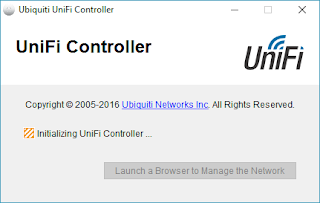
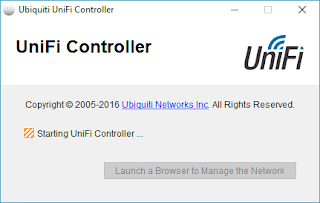
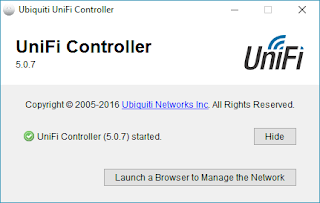
Click "Launch a Browser…"
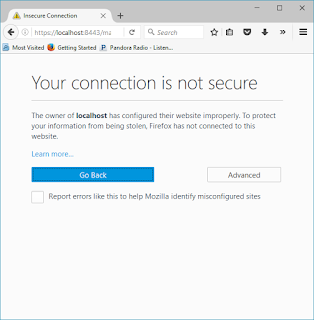
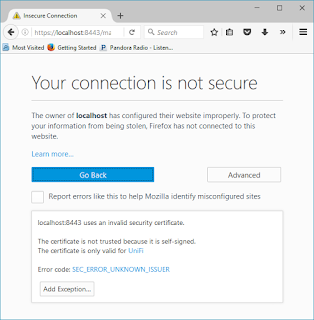
You may see this: Click "Advanced"
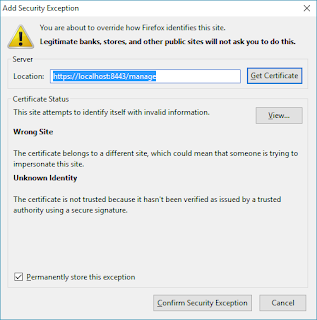
Click "Add Exception…"
Click "Confirm…"
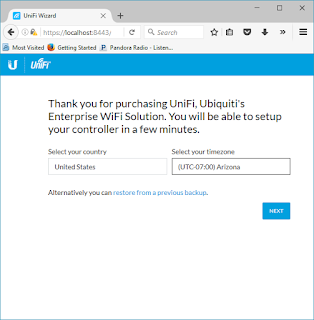
Verify your Country and Timezone
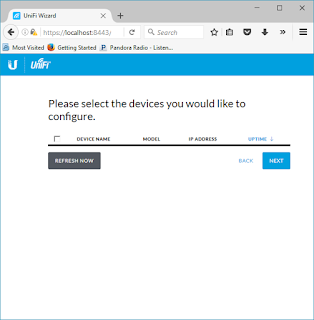
Note: This is where it gets interesting. If you have a single VLAN home network, no issues. If you have multiple VLANs, make sure the AP and the device the server are running on are in the same VLAN.
The AP light will turn white. Select "Refresh Now"
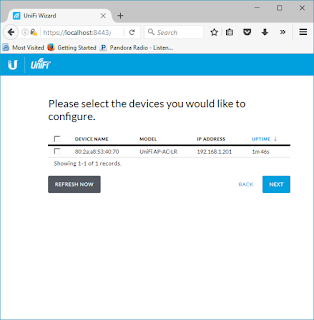
Select the checkbox next to the AP and select "Next"
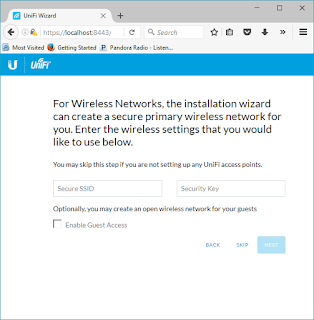
Put in the SSID and Wireless Key you want to use.
Select "Next"
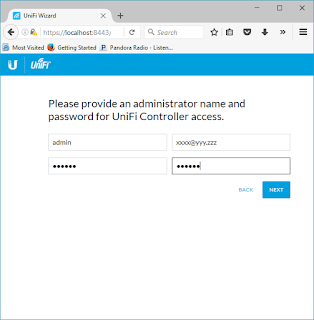
Put in the administrative information. Select "Next"
Then select "Finish"
The installation now takes you to the Unifi controller
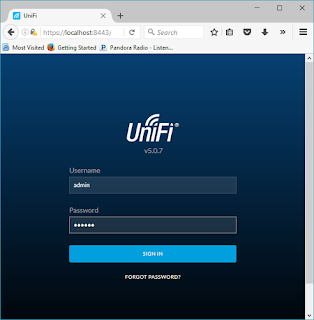
Sign in with the administrative name and password you set earlier
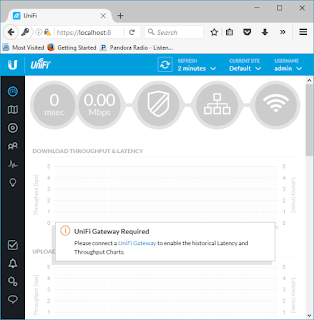
Select Devices Icon - third icon in the black menu on the left
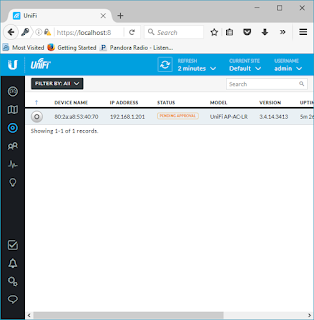
The AP(s) will auto-magically discover if it is connected.
Notice "Pending Approval" in the Status.

Scroll to the right of the window and select "Adopt" under actions menu
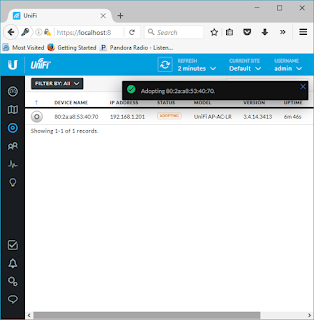
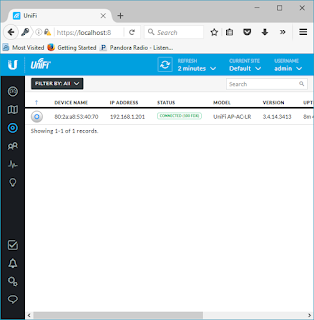
It is now "CONNECTED" and the SSID is broadcasting. The light on the AP switched to a Blue hue.
Feel free to use the user guide to customize your wireless.
AP Installed:
Used two of the expansion anchors in the screws pack.
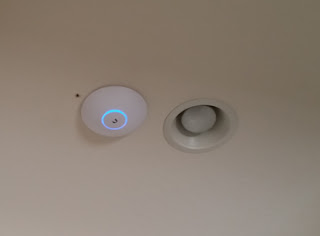
Cute. Lots better than the 6 legged black spider I had up there before. Wife likes the looks of it a LOT better.
Entire Installation: About 1.5 hr. It took longer to get the old AP off the ceiling than it did to configure the software and install the APs. The locking mounting bracket of the old AP gave me so much trouble.
Yeah, I need to patch the hole where the anchor pulled out from the last AP.
Final thoughts after using it for a couple of days.
If you are in a relatively small living space, use the wireless on your router. I'm not sure you'd get much more out of this solution.
If you are living in a larger space, that may require 2 or more APs for coverage, consider this AP. Also, consider the single channel roaming configuration if you want to be really cutting edge.
It's provided really good performance at distance. More than I expected for approximately $200 and as good as I was getting out of a major enterprise brand Controller plus WAPs of the 802.11n generation. Also, "way better" than 3 of the current top of the line SOHO brand 802.11ac routers I have.
I won't be taking them down anytime soon. Hope I get the same 6 years of use out of these that I did with the previous APs. Even if I didn't, I could replace them 10 times over and it wouldn't cost more than the previous installation.
Recommendation: HIGH
When the home wireless starts looking like it needs a refresh, my go-to has historically been an enterprise grade wireless system.
I've been reading the reviews of the Ubiquiti product line (Ubiquiti UAP-AC-LR) and decided it was time to give them a try. If for no other reason than many people reported that it was A) difficult to set up and B) used by WLAN engineers and C) cost (how they do it for this price is pretty cool).
A) Not true
B) Ok. I believe that anyone that can install a java server app could probably do the "home" level configuration work.
C) Yeah, $200, not $2000
I chose 2 of the LR model. Coverage of my home with N required 2, so these most likely to require 2. BTW, WLAN site survey, should probably be done. I did one for my home for N, so pretty much knew what the freq coverage pattern needed to look like.
Received them 2 days after ordering, when Amazon Prime works, it really works.
Unboxing:
 |
| Ubiquiti UAP-AC-LR |
2 manuals, may open them one day.
A sub ceiling drill-through mounting bracket with screws. Won't be using that.
A PoE injector with power cable. Nice addition if you don't have a PoE switch.
Access Point with mounting bracket.
Controller Installation:
https://www.ubnt.com/download/unifi -> Unifi controller for Windows (going to run it on my media server)
There is also a user guide on this page for the controller.
Java needs to be installed on the computer.
Once installed, this dialog pops up. It's a direct link to https://localhost:8443


Click "Launch a Browser…"

You may see this: Click "Advanced"

Click "Add Exception…"

Click "Confirm…"

Verify your Country and Timezone

Note: This is where it gets interesting. If you have a single VLAN home network, no issues. If you have multiple VLANs, make sure the AP and the device the server are running on are in the same VLAN.
The AP light will turn white. Select "Refresh Now"

Select the checkbox next to the AP and select "Next"

Put in the SSID and Wireless Key you want to use.
Select "Next"

Put in the administrative information. Select "Next"
Then select "Finish"
The installation now takes you to the Unifi controller

Sign in with the administrative name and password you set earlier

Select Devices Icon - third icon in the black menu on the left

The AP(s) will auto-magically discover if it is connected.
Notice "Pending Approval" in the Status.

Scroll to the right of the window and select "Adopt" under actions menu


It is now "CONNECTED" and the SSID is broadcasting. The light on the AP switched to a Blue hue.
Feel free to use the user guide to customize your wireless.
AP Installed:
Used two of the expansion anchors in the screws pack.

Cute. Lots better than the 6 legged black spider I had up there before. Wife likes the looks of it a LOT better.
Entire Installation: About 1.5 hr. It took longer to get the old AP off the ceiling than it did to configure the software and install the APs. The locking mounting bracket of the old AP gave me so much trouble.
Yeah, I need to patch the hole where the anchor pulled out from the last AP.
Final thoughts after using it for a couple of days.
If you are in a relatively small living space, use the wireless on your router. I'm not sure you'd get much more out of this solution.
If you are living in a larger space, that may require 2 or more APs for coverage, consider this AP. Also, consider the single channel roaming configuration if you want to be really cutting edge.
It's provided really good performance at distance. More than I expected for approximately $200 and as good as I was getting out of a major enterprise brand Controller plus WAPs of the 802.11n generation. Also, "way better" than 3 of the current top of the line SOHO brand 802.11ac routers I have.
I won't be taking them down anytime soon. Hope I get the same 6 years of use out of these that I did with the previous APs. Even if I didn't, I could replace them 10 times over and it wouldn't cost more than the previous installation.
Recommendation: HIGH
Wednesday, March 16, 2016
Home Lab
 |
| Lab Network Diagram |
The network topology was extremely pragmatic. I wanted to have a setup I could move if I needed to.
You see, I live in Arizona. Having it in my office in the summer, well, it's already hot here, why add to my discomfort.
So, I've purchased a small wire cart, put the computers and network on it. Added an old KVM switch I had laying about, as well as a usable but extremely old Dell monitor, mouse and keyboard. Wired it up to an old wireless game repeater I had from back in my Xbox days and...
 |
| Equipment Deployment |
Completely mobile except for power. I could add a UPS, maybe one day.
Left to right,
Lab 3, running my current Arista Spine and Leaf simulator, on VirtualBox on Ubuntu 14.04.
Lab 2, running OpenStack on Ubuntu 14.04.
Labcore, box I got from a friend upgrading, running Ubuntu 14.04 for anything else I may need to do in the rack.
Network switch, 8 x 1Gbps NetGear SOHO, router, Buffalo SOHO running DDWRT.
Lab 3 and 2 specs are buried somewhere in my blog if you're interested.
Anyway, can't wait for summer.
If you're interested in sharing your home lab picts, tweet 'em to me @abusedbits #homelab
Thursday, August 20, 2015
What's it running on?
I've a request to share the platform this is all running on.
Here's the itemized list:

As you can tell from the graphic, this is Lab02. Lab01 is my OpenStack rig identified in the earlier part of the blog.
Before anyone says anything, yeah, the PS is overkill and the motherboard is...interesting, but I've got multiple plans for the box itself. This is just one use case. :-)
If you plan on building a unit to do the same, consider the PSU, the CPU, the water cooler and the memory for cost reductions... You could probably come in under $800 if you really squeezed it.
I can't recommend the SSD enough though. Fast...
Here's the itemized list:

Before anyone says anything, yeah, the PS is overkill and the motherboard is...interesting, but I've got multiple plans for the box itself. This is just one use case. :-)
If you plan on building a unit to do the same, consider the PSU, the CPU, the water cooler and the memory for cost reductions... You could probably come in under $800 if you really squeezed it.
I can't recommend the SSD enough though. Fast...
Subscribe to:
Posts (Atom)